Here's what actually happened, details changed to protect the client: an employee at a mid-size company received an email that looked like an internal HR notice. The message was short — a couple of sentences about an update to the employee benefits eligibility policy, asking her to review her "updated payroll information" — and a QR code. No links in the text. No attachment. Just a paragraph and an image.
She scanned it with her phone, landed on a page that looked exactly like the Microsoft 365 login screen, and entered her credentials. Within hours, her compromised mailbox had sent roughly 700 phishing emails to her contacts, each one carrying the same attack forward to the next person's inbox.
Why the filter never saw it
This is the part worth understanding, because it explains why "we have Microsoft 365's built-in protection" or "we have Barracuda" didn't help here. Email filters are built to inspect text — the actual characters in the message body — checking links against known-bad domain lists and scanning for suspicious patterns in the words themselves. This email had no text-based link for a filter to check at all. The entire malicious payload existed as pixels inside an embedded image: a QR code. There was nothing in the message body a text-scanning filter could flag as a link, because there wasn't one, in the form the filter was built to look for.
This isn't a QR-code-specific quirk, either — it's a blind spot in how these filters fundamentally work. The same gap shows up with a malicious link embedded inside a PDF attachment instead of the message body: the URL exists, but not as scannable text the filter's link-checking logic ever touches. Most small-business email security setups aren't built to decode QR codes or parse links out of PDF content — they're built around the assumption that a link is text, and this attack simply doesn't put it there.
Detection that doesn't need special tooling
You don't need QR-aware filtering to catch most of these — you need to know what to actually look at, which most people never do because email trains everyone to skim.
- Check the sender header against the claimed sender. The visible "from" name can say anything — "HR Department," "Payroll," whatever the message body claims. The actual sending address, visible when you check the header or hover over the sender name, often doesn't match the domain it's pretending to be from at all. This single check catches a large share of these before anyone needs to think about the QR code specifically.
- Treat manufactured urgency and secrecy as a red flag, not a real policy. "Do not share this email" or "please do not share this link or access code with others" reads like a legitimate confidentiality notice, but no genuine internal HR or payroll communication asks an employee to keep the message itself secret from coworkers or IT. That instruction exists specifically to stop someone from asking a colleague "hey, did you get this weird email too?" — which is exactly the conversation that would expose it. Secrecy language in an unsolicited email is a manipulation tactic, not a corporate policy.
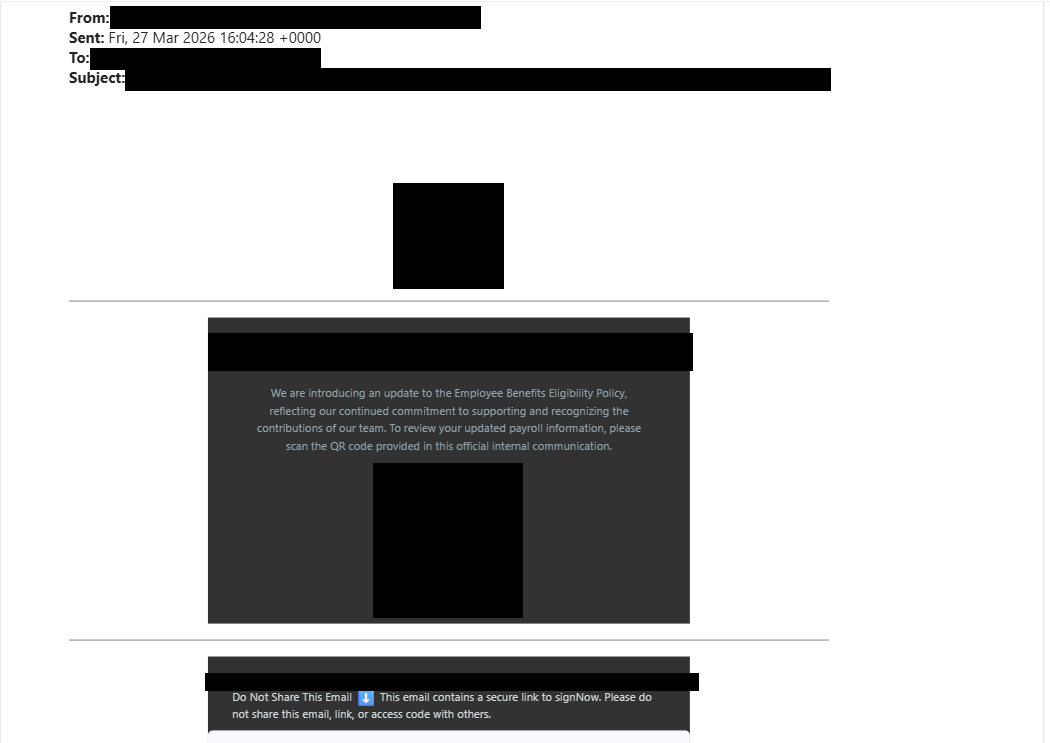
The email above shows both patterns at once: urgent-sounding but vague subject matter, a QR code standing in for a text link, and a "do not share this email" footer designed to keep the recipient from checking with anyone else before scanning it.
What to tell a client
Frame this as a real, current risk rather than a hypothetical, since it's a genuinely common attack pattern right now, not an edge case:
- Explain the mechanism plainly, not just the outcome. "Your email filter checks links in text — this attack put the link inside an image instead, which is why it got through" gives a client something concrete to understand, rather than just "phishing got past our filter," which sounds like the filter failed at its job when really it was never built to catch this specific shape of attack.
- Recommend security awareness training that specifically covers QR codes. General phishing training that only talks about suspicious links misses this entirely if it doesn't explicitly call out QR codes as a delivery method. Make sure whatever training a client uses actually covers it by name.
- Recommend verifying unusual requests through a second channel. A quick message to HR or IT through a channel other than the email itself — a phone call, a separate chat platform — would have caught this in seconds. This is the single cheapest, most effective mitigation available to a client with no budget for new tooling.
Bookmark this page — it's built to be the reference you share with a client or their leadership any time QR code phishing needs explaining from scratch.